
• How to Have Janitor AI Speak to You: Voice Chat and Character Setup (2026)

    TL;DR Key Takeaway & Summary

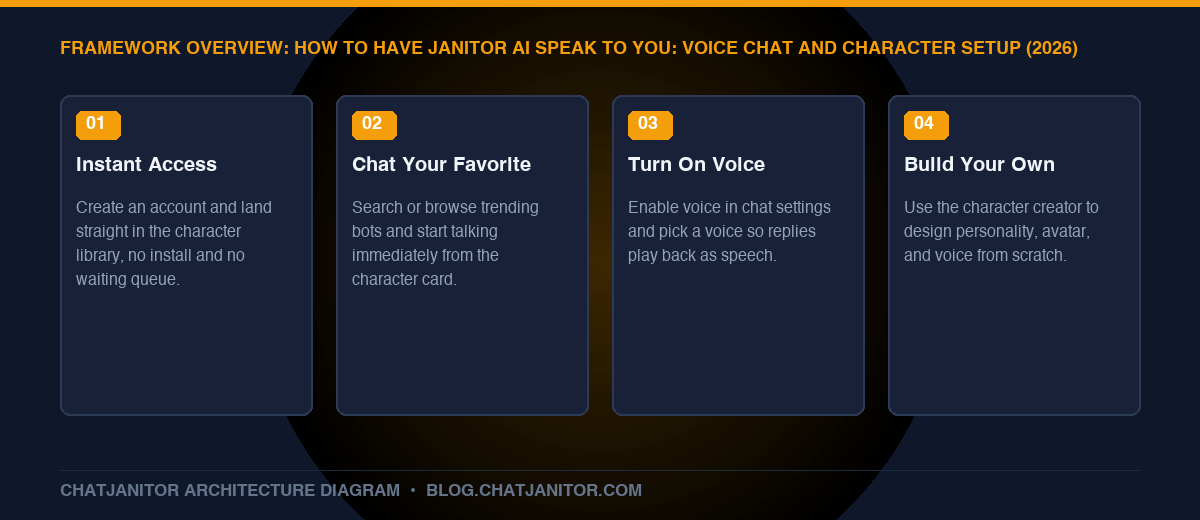
    Getting a character to actually speak to you on ChatJanitor takes three steps: pick a character from the library (or build your own in a couple of minutes), open its chat, and turn on voice from the chat settings. No downloads, no complicated setup — just an account and a character you want to talk to.

    Key Takeaways

    • Zero-friction start: Create an account and you’re chatting within seconds — no app install, no waiting list.
    • Instant access to favorites: Browse the community library and start talking to a character you already love immediately.
    • Voice makes it feel real: Turning on voice chat gives your favorite characters an actual spoken voice, not just text replies.
    • Build your own if none quite fit: The character creator lets you design a bot’s look, personality, and voice from scratch in minutes.
    • Personalize everything: Your own persona, the bot’s voice, and its personality can all be tuned to exactly how you want to experience the chat.

    1. Getting Started on ChatJanitor Takes Seconds

    There’s no lengthy setup between you and your first conversation:

    1. Create an account with email or Discord — no waiting period, no approval queue.
    2. Set up your persona once (a name and a short description of who you are in the chat) so every character you talk to recognizes you consistently.
    3. Land straight on the character library, already sorted by trending, new, and top-rated bots.

    That’s the whole barrier to entry. From here, everything is about choosing who you want to talk to and how you want to hear from them.

    2. Chat Instantly With Your Favorite Character

    If you already have a character in mind — a personality you’ve seen recommended, a franchise favorite, or a companion type you enjoy — finding and starting that conversation is immediate:

    • Search by name or tag in the library to jump straight to a specific character.
    • Browse trending and featured bots if you’re not sure yet and want inspiration.
    • Tap the character card and start typing — there’s no separate “setup mode” before the conversation begins.

    The chat opens with the character’s own greeting message already in character, so the conversation feels alive from your very first message rather than starting from a blank screen.

    3. Give Your Bot a Voice

    This is what turns a character from “text on a screen” into something that actually feels like it’s speaking to you:

    1. Open the chat settings for the character you’re talking to.
    2. Turn on voice for that conversation.
    3. Choose a voice that fits the character, if more than one option is available for that bot.
    4. Send a message as usual — the reply now plays back as speech in addition to appearing as text.

    🔊 Why Voice Changes the Experience

    Reading a reply and hearing it are genuinely different experiences — tone, pacing, and personality come through in a way plain text can’t fully capture. Voice is especially popular for companion-style characters and long-running story arcs, where hearing the same “voice” consistently makes the relationship feel continuous across sessions.

    4. Build a Character That Truly Feels Like Your Own

    If no existing character quite matches what you’re looking for, creating one takes only a few minutes:

    1. Give it an identity — a name, a short one-line premise, and an avatar.
    2. Define the personality — traits, speech style, and background, using our character card templates if you want a proven starting structure.
    3. Write an opening message that sets the tone immediately, so the very first thing your character does is stay in character.
    4. Assign a voice during setup so the character speaks the way you imagined it from the very first conversation, not as an afterthought.

    For the full step-by-step creator walkthrough — including sample dialogue and avatar tips — see our complete bot creation guide.

    5. Personalize Everything About the Experience

    Voice and character choice are just the start. A few more settings make the experience feel tailored specifically to you:

    What You Can Personalize Where It Lives
    Your own persona (name, description) Account/profile settings
    Character personality and backstory Character creator
    Character’s voice Chat settings, per character
    Response length and creativity Generation settings
    Formatting style (action beats, dialogue) Commands and formatting guide

    Combining these means two people can talk to the exact same character and have noticeably different experiences — which is the point. The platform is built around making the character feel like yours, not a fixed, one-size-fits-all script.

    FAQ

    Do I need to set anything up before a character can speak to me?

    Just turn on voice in that chat’s settings and pick a voice if more than one is offered — there’s no separate account-level setup required.

    Can every character use voice?

    Voice availability can depend on the specific character and current platform settings — check the chat settings panel for that character to see what’s offered.

    Can I change a character’s voice after I’ve already started chatting with it?

    Yes — voice selection lives in the chat settings for that character, so you can switch it at any time without losing your conversation history.

    What if I want a completely custom character instead of one from the library?

    Use the character creator to build one from scratch — see our step-by-step guide for personality, avatar, and opening message tips.

    Conclusion

    Getting Janitor AI to speak to you isn’t a technical project — it’s picking a character, flipping on voice, and optionally building your own if nothing in the library feels quite right. Between instant access to favorites, voice chat, and full character customization, the experience is built to feel personal from the very first message.

  • Character.AI Review 2026: Filters, Safety Bans and a Freer Alternative

    TL;DR Key Takeaway & Summary

    Character.AI is the most recognizable name in AI character chat, but its strict content filters, expanding safety restrictions, and reports of account bans push many users to search for “character ai but no filter” workarounds or a different platform entirely. ChatJanitor takes the opposite approach: a native model built for unrestricted creative writing from day one, with no filter-evasion prompts required.

    Key Takeaways

    • Character.AI Prioritizes Broad Safety Filters: Its content policy is intentionally conservative, which means mature, dark, or morally complex creative writing is frequently blocked or redirected mid-scene.
    • “Character AI But No Filter” Is a Common Search — With Real Risk: Filter-bypass mods and unofficial clients can violate terms of service and put your account at risk of suspension.
    • Reports of “Character AI Downfall” Reflect User Frustration: Search trends around declining quality/filter fatigue reflect a real, ongoing user migration toward less restrictive platforms.
    • ChatJanitor Skips the Filter-Fighting Entirely: JanitorLLM is natively built for mature creative freedom, so there’s no need for jailbreak prompts or unofficial mods.
    • Character Cards Are Portable: Many personality/backstory structures can be recreated on ChatJanitor using standard character card templates.

    1. What Character.AI Does Well

    To give a fair review, Character.AI has real strengths that explain its popularity:

    • Massive character library and strong brand recognition.
    • Polished mobile apps on iOS and Android with a clean, simple interface.
    • Fast response times on most standard chats.
    • Large creator community actively publishing new characters daily.

    2. Where Character.AI Frustrates Users

    ⚠️ The Filter Problem

    Character.AI applies broad content filters that can interrupt scenes for non-explicit mature themes — combat violence, dark emotional content, or romantic tension — not just explicit content. This is why searches like “character ai but no filter” and “c ai no filter mod” are so common: users are looking for workarounds to a restriction baked into the core product.

    • Over-aggressive content moderation: Filters can trigger on innocuous dialogue, breaking immersion mid-scene.
    • Account suspension risk: Using unofficial “no filter” mods or client hacks can violate terms of service.
    • Message rerouting: Some replies get silently swapped for generic, filtered responses without clear explanation.
    • “Downfall” sentiment: A recurring theme in user discussions is that quality and creative freedom have declined over time as filters tightened further.

    3. Character.AI vs. ChatJanitor: Side-by-Side

      Character.AI ChatJanitor
    Content Filter Strict, broad safety filters by default Native unrestricted model — see SFW/NSFW guide
    Filter Workarounds Needed? Yes, often via unofficial mods (ToS risk) No — creative freedom is the default
    Model Transparency Closed, proprietary model JanitorLLM + optional API keys (OpenRouter, DeepSeek)
    Mobile Access Native app store apps Browser-based PWA, no app-store restrictions
    Character Customization Persona fields, limited structure Full W++/JSON character cards

    For a deeper technical comparison (memory, prose quality, mobile usability), see our full Janitor AI vs Character AI breakdown.

    4. Moving a Character Concept From Character.AI to ChatJanitor

    1. Don’t try to export data directly — there’s no official migration tool between platforms.
    2. Recreate the personality using our character card templates (W++, AliChat, or JSON V2 format).
    3. Rebuild key backstory/lore using lorebooks and world info so nothing gets lost.
    4. Tune generation settings to match the tone you want — see settings guide.

    FAQ

    Is Character.AI worth using in 2026?

    It’s still strong for casual, filtered conversations and has a huge character library — but its content filters are a real limitation for mature or complex creative writing.

    Is it safe to use “no filter” mods for Character.AI?

    Unofficial mods and filter-bypass tools generally violate the platform’s terms of service and can put your account at risk of suspension — proceed with caution, or consider a platform built for creative freedom by default.

    What’s a good Character.AI alternative without heavy filters?

    ChatJanitor is built specifically around unrestricted creative roleplay with its native JanitorLLM model — no filter-bypass workarounds needed.

    Conclusion

    Character.AI remains a polished, popular entry point to AI character chat, but its aggressive content filtering is the platform’s most common source of user frustration — and the reason so many eventually search for alternatives. ChatJanitor was built to remove that friction entirely.

  • Talkie AI Review: Features, Downloads and a More Open Alternative (2026)

    TL;DR Key Takeaway & Summary

    Talkie is a mobile-first AI character chat app known for a polished interface and voice features, but its content policy is comparatively conservative and it’s app-install dependent, which is why “unblocked Talkie” and install workaround searches are common. ChatJanitor runs directly in the browser with no install, no app-store restrictions, and a native model built for unrestricted creative roleplay.

    Key Takeaways

    • What Talkie Offers: A mobile app for AI character chat with voice call features and a curated character catalog.
    • Why “Unblocked Talkie” and Install Searches Happen: App-store availability, regional restrictions, or school/work network blocks commonly push users to search for workarounds.
    • ChatJanitor Sidesteps the Install Problem Entirely: It runs as a browser-based Progressive Web App — no app store, no install approval needed, no network-level app blocks to work around.
    • Content Freedom Differs: Mobile app-store apps generally enforce stricter content policies than browser-based platforms due to platform store rules — relevant if unrestricted creative writing is your goal.

    1. What Is Talkie AI?

    Talkie is a mobile character-chat app offering a curated library of AI personas, with features like voice calls and a social-style discovery feed. Like most app-store-distributed AI companion apps, it operates under the content restrictions that Apple’s App Store and Google Play impose on all apps in this category — which tends to make the experience more conservative than browser-based alternatives.

    Why People Search “Unblocked Talkie” or “Talkie AI Download”

    • Regional app store availability can vary, leading to sideloading or workaround searches.
    • School/work network filters commonly block app stores or specific app domains, prompting “unblocked” searches.
    • Install friction — needing to find and install an app is a bigger commitment than opening a browser tab.

    2. Talkie vs. ChatJanitor: Side-by-Side

      Talkie AI ChatJanitor
    Access Method Native mobile app install required Browser-based, works instantly on any device
    Blocked by Network Filters? App stores/domains are commonly blocked Standard web access, no app-store dependency
    Content Policy App-store-compliant, more conservative Native unrestricted model — see SFW/NSFW guide
    Character Customization Curated catalog, limited editing Full character creator — see templates
    Model Control Fixed Adjustable settings + optional API keys — see API setup

    3. Getting Set Up on ChatJanitor Without Install Headaches

    📱 No App Store, No Install Approval

    Because ChatJanitor runs as a web app, you avoid app-store review restrictions, regional availability gaps, and most network-level app blocks that affect native apps like Talkie. Open it in any mobile or desktop browser and optionally save it to your home screen as a PWA for an app-like experience.

    1. Open ChatJanitor in your mobile or desktop browser — see our beginner’s guide.
    2. Browse the character library or create your own bot.
    3. Adjust generation settings to match the tone you want — see settings guide.
    4. Optionally save the site to your home screen for quick access, no app-store install needed.

    FAQ

    Why can’t I download Talkie AI in my region or network?

    App-store availability varies by region, and school/work networks frequently block app-store domains outright — this is why “unblocked Talkie” is a common search.

    Is there a version of Talkie-style AI chat that doesn’t require an app install?

    Yes — browser-based platforms like ChatJanitor offer the same character-chat concept without needing an app-store install, sidestepping regional and network restrictions.

    Does ChatJanitor have voice chat like Talkie?

    ChatJanitor’s core strength is deep, customizable text roleplay with adjustable model settings; check current platform features directly for the latest on voice support.

    Conclusion

    Talkie’s app-install requirement creates real friction — regional availability, network blocks, and app-store content restrictions all get in the way. ChatJanitor removes that friction entirely as a browser-based platform with a native unrestricted model and full character customization.

  • Perchance AI Character Chat: How It Works and Better Alternatives (2026)

    TL;DR Key Takeaway & Summary

    Perchance’s AI character chat generator is a free, no-signup browser tool popular for quick, disposable character conversations. It’s convenient, but its simplicity is also its ceiling — no persistent accounts, limited memory, and minimal customization. For a saved character library, deeper memory, and tunable models, roleplayers typically graduate to ChatJanitor.

    Key Takeaways

    • What Perchance Is: A free, community-built generator platform (not limited to AI chat) where the “AI Character Chat” generator lets you talk to a randomly-themed or custom character with no account required.
    • No Signup = No Persistence: Without an account system, your character library and chat history typically don’t carry over reliably between sessions or devices.
    • Best For: Quick, disposable roleplay sessions or testing a character concept before investing more time elsewhere.
    • ChatJanitor Advantage: Persistent accounts, a full community character library, adjustable generation settings, and long-term memory support.

    1. How Perchance AI Character Chat Works

    Perchance is a platform for community-made generators of all kinds (name generators, story prompts, and more), and its AI Character Chat generator applies that same open, no-signup philosophy to conversational roleplay:

    • No account required — you can start chatting immediately.
    • Characters can be randomly generated or manually described.
    • Because there’s no persistent account layer, saved characters and long chat histories are not the platform’s strength.

    This makes Perchance a genuinely useful quick-start tool — great for testing an idea in seconds — but not built for maintaining an ongoing roleplay relationship or a curated bot collection over time.

    2. Perchance vs. ChatJanitor: Side-by-Side

      Perchance AI Character Chat ChatJanitor
    Account System No signup required Full account with saved character library
    Character Persistence Limited/session-based Characters and chat history persist across sessions
    Customization Depth Basic description fields Full W++/JSON character cards — see templates
    Model Control Fixed, limited settings Adjustable temperature, tokens, context — see settings guide
    Long-Term Memory Minimal Lorebooks/world info supported — see memory guide
    Best Use Case Fast, disposable experimentation Ongoing character relationships and deeper storytelling

    3. When to Use Perchance vs. When to Move to ChatJanitor

    🧭 Quick Decision Guide

    Use Perchance if you want to test a character concept in the next 10 seconds with zero commitment. Move to ChatJanitor once you know the character is worth developing further — you’ll get persistent memory, deeper customization, and the ability to fine-tune generation quality.

    1. Prototype the concept on Perchance if you just want to see whether an idea works.
    2. Rebuild it properly on ChatJanitor using our character creation guide once you’re ready to invest in the character long-term.
    3. Add depth with formatted action beats and dialogue — see our writing style guide.
    4. Anchor important lore so the character stops forgetting details — see lorebooks guide.

    FAQ

    Does Perchance save my AI character chats?

    Because Perchance’s character chat generator doesn’t require an account, chat history and character persistence are limited compared to account-based platforms.

    Can I import a Perchance character into ChatJanitor?

    There’s no direct import tool, but you can quickly recreate a character’s personality and backstory using ChatJanitor’s character card templates.

    Is Perchance AI Character Chat free?

    Yes, Perchance’s generators are free and don’t require signup, which is part of their appeal for quick experimentation.

    Conclusion

    Perchance’s no-signup AI character chat is a genuinely handy tool for fast experimentation, but its lack of persistent accounts and deep customization becomes a limitation for serious roleplayers. ChatJanitor picks up exactly where Perchance leaves off — persistent characters, deeper memory, and full control over generation settings.

  • PolyBuzz AI Review: Features, Pricing and Best Alternatives (2026)

    TL;DR Key Takeaway & Summary

    PolyBuzz (also searched as “Poly AI” or “Pollybuzz”) is a mobile-first AI character chat app. It’s a reasonable option for quick casual chats, but users looking for deeper customization, a free unrestricted native model, and a larger creator-driven library often end up comparing it to ChatJanitor.

    Key Takeaways

    • What Is PolyBuzz? A mobile app for chatting with AI-generated characters, similar in concept to Character.AI and Janitor AI but with its own character library and app-store presence.
    • Message Limits Are Common on Mobile Companion Apps: Check current in-app pricing, since free tiers on mobile-first apps frequently cap daily messages.
    • ChatJanitor Emphasizes Depth Over Mobile Polish: A larger, more customizable character system and native unrestricted model, accessible from any browser.
    • “Apps Like Poly AI” Searches Usually Want: more customization, fewer message caps, or a different content policy — all reasons people compare toward ChatJanitor.

    1. What Is PolyBuzz (Poly AI)?

    PolyBuzz — sometimes searched as “Poly AI,” “Poly.AI,” or misspelled “Pollybuzz” — is a mobile app offering AI character chat, positioned similarly to Character.AI: browse or create characters, then chat with them through a phone-first interface.

    Typical PolyBuzz Feature Set

    • Mobile app (iOS/Android) as the primary access point.
    • A library of user-created and featured characters.
    • Freemium pricing — free tier with usage limits, paid tier for expanded access.

    Feature sets and pricing on any consumer app change over time, so always confirm current details directly on the app’s own store listing or website before deciding.

    2. PolyBuzz vs. ChatJanitor: Side-by-Side

      PolyBuzz (Poly AI) ChatJanitor
    Primary Access Mobile app first Browser-based (mobile web + desktop), works as a PWA
    Free Tier Message-limited on most companion apps Free native JanitorLLM model, no hard character cap
    Character Creation Depth Basic persona fields Full W++/JSON character cards — see templates
    Custom API Models Not typically supported Connect OpenRouter/DeepSeek for full control — see API setup
    Content Policy Verify current app store listing Documented — see SFW/NSFW guide

    3. Best “Apps Like Poly AI” for More Customization

    If you found PolyBuzz’s character depth or message limits too restrictive, here’s what to look for in an alternative:

    1. A full character creator — not just a short bio field, but structured personality, speech style, and backstory control. See our bot creation guide.
    2. Adjustable generation settings — temperature, tokens, and context window that you can actually tune. See settings guide.
    3. No hard message ceiling on the free tier, or a clear, honest explanation of what’s limited.
    4. Long-term memory support via lorebooks/world info — see our memory guide.

    🔁 Switching From PolyBuzz to ChatJanitor

    Your existing characters won’t transfer automatically between apps, but recreating a favorite persona is quick using ChatJanitor’s character card templates. Start with our copy-paste templates and adapt the personality and speech style to match.

    FAQ

    Is PolyBuzz the same as Poly AI or Pollybuzz?

    These are common alternate spellings/searches for the same app category — always confirm you’re on the official app listing before entering any payment information.

    Is PolyBuzz free to use?

    Most mobile companion apps, PolyBuzz included, offer a free tier with usage limits and a paid tier for expanded access — check the current app store listing for exact terms.

    What’s a good alternative to PolyBuzz for deeper character customization?

    ChatJanitor offers a full character creator, adjustable generation settings, and a free native model without the mobile-app message ceilings common on companion apps.

    Conclusion

    PolyBuzz works well for quick, casual mobile character chats, but users wanting deeper customization, adjustable model settings, or a larger free tier frequently move toward ChatJanitor.

  • ThotChat AI Review: Is It Safe? Plus a Better Free Alternative (2026)

    TL;DR Key Takeaway & Summary

    ThotChat AI is one of many smaller unfiltered AI chat apps that show up in searches for adult-oriented AI companions. Before signing up, weigh it against a more established platform: ChatJanitor offers a free native model, a large community character library, and a transparent, published content policy — advantages worth comparing before you commit to a lesser-known app.

    Key Takeaways

    • Check Safety Basics First: For any lesser-known app like ThotChat AI, verify it has a published privacy policy, clear content rules, and secure account handling before sharing any personal data.
    • “Is X Safe?” Should Always Be Answered by the App’s Own Policy — not by third-party blog claims, including this one. Read the app’s terms directly.
    • ChatJanitor Is a More Established Alternative: A large existing character library, native unrestricted model, and documented safety redlines — see our SFW/NSFW policy guide.
    • Free Doesn’t Always Mean Feature-Complete: Compare message limits, memory depth, and character variety before assuming “free” apps are equivalent.

    1. What Is ThotChat AI?

    ThotChat AI is one of a growing wave of adult-oriented AI chat apps that market themselves around unrestricted conversation. As with any smaller or newer app in this category, the core questions worth answering before you use it are the same ones you’d ask of any chat platform handling personal or sensitive content:

    • Does it have a clearly published privacy policy?
    • Is there a documented content policy defining what is and isn’t allowed?
    • How is chat history stored, and can you delete it?
    • Is the company behind it identifiable and has a track record?

    If you can’t quickly find clear answers to these on the app itself, that’s a meaningful signal to compare alternatives before committing.

    2. Is ThotChat AI Safe? How to Evaluate It Yourself

    🔍 A Quick Safety Checklist for Any Unfiltered AI Chat App

    1) Published privacy policy and terms of service. 2) Clear age-verification (18+) gating for mature content. 3) Documented redlines against illegal content categories. 4) A visible way to delete your account and data. If an app is missing more than one of these, treat it as higher risk and compare it against a platform with a longer track record, like ChatJanitor.

    We can’t audit every third-party app’s backend, so treat any specific safety claim — including anything you read about ThotChat AI online — as something to verify directly on the app’s own policy pages, not take on faith.

    3. ThotChat AI vs. ChatJanitor: Side-by-Side

      ThotChat AI (and similar smaller apps) ChatJanitor
    Character Library Typically limited or single-focus Large, community-driven character library
    Free Tier Varies, often limited Free native JanitorLLM model
    Custom Character Creation Often minimal Full character creator with W++/JSON templates — see templates
    Published Content Policy Verify directly on the app Documented — see SFW/NSFW guide
    Track Record Newer/smaller apps vary Established platform with an active community

    4. Getting Started on ChatJanitor Instead

    1. Create a free account and set up your persona — see our beginner’s guide.
    2. Browse the character library or build your own bot.
    3. Tune generation settings for the tone you want — see settings guide.
    4. Review the privacy and safety model before diving in — see is ChatJanitor safe.

    FAQ

    Is ThotChat AI free to use?

    Feature availability and pricing for smaller third-party apps change frequently — check the app’s own pricing page directly for current terms.

    What’s a safer alternative to lesser-known unfiltered AI chat apps?

    Look for platforms with a published privacy policy, documented content rules, and an established track record. ChatJanitor publishes both its content policy and privacy practices openly.

    Can I import characters or chats between apps?

    Generally no — most platforms don’t support direct chat history import, though character card formats like W++ and JSON V2 are portable across several AI roleplay platforms.

    Conclusion

    Smaller unfiltered AI chat apps like ThotChat AI come and go quickly in this space, which makes due diligence important before you invest time building a relationship with a character. ChatJanitor offers a longer track record, a larger character library, and transparent policies worth comparing first.

  • Best AI Girlfriend Chat Apps: Free Options Compared (2026)

    TL;DR Key Takeaway & Summary

    Most “AI girlfriend” apps lock you into one pre-built personality and paywall unlimited messaging. ChatJanitor takes a different approach: instead of one fixed companion, you get a free native model and an entire community library of custom-built characters — including romance-focused personas you fully control, with unlimited free-tier chatting.

    Key Takeaways

    • Fixed Persona vs. Custom Character: Dedicated “AI girlfriend” apps give you one personality; ChatJanitor lets you choose or build the exact companion persona you want.
    • “Free” Often Means Message-Limited: Many free ai girlfriend chat apps cap free messages per day, then push a subscription — check the fine print before committing.
    • Memory Quality Varies Enormously: A companion that forgets your relationship history after 10 messages breaks immersion fast; see how memory works in our lorebooks guide.
    • Privacy Should Be a Deciding Factor: Before you get emotionally invested, check what happens to your chat data — see is Janitor AI / ChatJanitor safe.
    • ChatJanitor’s Free Tier Has No Hard Character Cap: You can chat with, switch between, or create multiple companion personas without buying a separate subscription per character.

    1. What Makes a Good AI Girlfriend Chat App

    Before comparing specific apps, it helps to define what actually matters for a satisfying long-term companion experience:

    1. Consistent personality — the character shouldn’t randomly forget its own established traits.
    2. Long-term memory — callbacks to earlier conversations make the relationship feel real, not repetitive.
    3. Customization depth — can you shape appearance, personality, backstory, and tone, or are you stuck with a template?
    4. Honest pricing — “free” apps that gate basic messaging behind paywalls after day one are common; read reviews carefully.
    5. Data privacy — companion apps involve emotionally personal conversations, so data handling matters more than average.

    2. Category Comparison: Fixed-Persona Apps vs. Custom-Character Platforms

      Fixed-Persona AI Girlfriend Apps ChatJanitor (Custom Character Platform)
    Personality One pre-built companion per app/subscription Choose from a full community library, or build your own
    Free Tier Limits Often capped messages/day before paywall Free native model with no hard message cap
    Memory Depth Varies, often shallow on free tiers Configurable context window; see settings guide
    Multiple Companions Usually one per subscription Switch between unlimited characters for free
    Voice/Visual Add-ons Common premium upsell Focused on deep text roleplay quality first

    3. How to Get a Better “AI Girlfriend” Experience on ChatJanitor

    💡 Build a Companion That Actually Fits You

    Rather than adapting to a fixed template character, use ChatJanitor’s character creator to define your ideal companion’s personality, speech style, and backstory directly. See our step-by-step bot creation guide and copy-paste character templates for romance-focused personas.

    1. Start with a template. Use our romance and slow-burn character ideas as a base instead of starting from a blank page.
    2. Tune generation settings for more thoughtful, less repetitive replies — see temperature and token settings.
    3. Use action beats and formatting to make exchanges feel novel-grade rather than generic chatbot small talk — see our writing style guide.
    4. Set memory anchors for recurring relationship details (nicknames, shared history) using lorebooks.

    4. Red Flags When Choosing Any AI Girlfriend App

    • No published privacy policy or vague data-handling language.
    • “Unlimited free” claims that gate basic features behind in-app purchases immediately.
    • No way to customize or reset the personality if the default doesn’t fit you.
    • No content policy — apps with zero stated boundaries are a legal and safety red flag, not a selling point.

    FAQ

    Is there a truly free AI girlfriend chat option?

    Yes — ChatJanitor’s native model tier is free with no hard daily message cap, unlike many companion apps that gate messaging behind a subscription after a trial period.

    Can I customize my AI girlfriend’s personality?

    On fixed-persona apps, usually not much. On ChatJanitor, you can fully build or select a character’s personality, backstory, and speech style using the character creator.

    Does an AI girlfriend app remember previous conversations?

    Memory depth depends on the platform’s context window and any lorebook/world-info system in place — see our memory and lorebooks guide for how to configure this properly.

    Conclusion

    Fixed-persona “AI girlfriend” apps trade customization for simplicity, and often paywall basic usage. ChatJanitor offers a more flexible path: a free native model, full character customization, and an entire library of community-built companions instead of one fixed personality.

  • Uncensored AI Chatbots Explained: What ‘No Filter’ Really Means (2026)

    TL;DR Key Takeaway & Summary

    “Uncensored AI chatbot” almost never means an AI with zero rules — it means a platform that doesn’t wrap every reply in corporate-assistant guardrails, and instead enforces a narrower set of legal/safety redlines while allowing mature, unrestricted creative roleplay. ChatJanitor (Janitor AI) is one of the most established platforms built specifically around this model: a free native LLM with native creative freedom, plus the option to bring your own API for even more control. Read on before trusting any app that claims “zero rules.”

    Key Takeaways

    • “Uncensored” ≠ “No Rules”: Legitimate platforms still enforce strict redlines (no minors, no real-person harassment, no non-consensual exploitation) — anything claiming otherwise is a red flag, not a feature.
    • Two Different Approaches Exist: (1) a model natively trained for unrestricted creative writing, or (2) a heavily-filtered mainstream model “jailbroken” via prompt tricks — the two behave very differently in quality and reliability.
    • ChatJanitor Uses Approach #1 by Default: Its native JanitorLLM is built for creative freedom without requiring convoluted jailbreak prompts — see our full SFW/NSFW policy guide.
    • Safety & Privacy Still Matter: Even on unrestricted platforms, read the privacy policy and never share identifying personal information — see is ChatJanitor / Janitor AI safe.
    • Free Uncensored Generators Vary Wildly in Quality: Many “free uncensored AI” tools are thin wrappers around small open-source models with weak memory and inconsistent tone.

    1. What People Actually Mean by “Uncensored AI”

    Search terms like uncensored artificial intelligence, ai chat no limits, or free uncensored ai generator usually reflect frustration with mainstream assistants (ChatGPT, Gemini, Copilot) that refuse mature creative writing, romance, horror, or morally complex fiction outright. In the AI roleplay space, “uncensored” typically refers to a platform that:

    • Allows mature (18+) romantic and adult creative writing between consenting fictional characters.
    • Doesn’t lecture, refuse, or break character mid-scene for non-harmful creative requests.
    • Still refuses categorically illegal or exploitative content regardless of prompt engineering.

    The Two Technical Approaches

    Approach How It Works Typical Result
    Native Unrestricted Model The model is trained/tuned from the start for open creative writing (e.g., JanitorLLM on ChatJanitor). Consistent tone, no fighting the model, fast responses.
    Jailbroken Mainstream Model A heavily-filtered model (GPT-style) is coaxed via elaborate system prompts to bypass its default refusals. Inconsistent — can break character, refuse mid-scene, or degrade in quality as filters update.

    2. Why “Zero Filter” Claims Should Make You Cautious

    Any app marketing itself as having genuinely zero restrictions is worth a second look. Reputable uncensored AI roleplay platforms — ChatJanitor included — still enforce non-negotiable safety redlines:

    • No depictions involving minors, under any framing.
    • No non-consensual real-person content or harassment.
    • No content designed to facilitate real-world harm.

    A platform advertising “absolutely no rules” is either exaggerating for marketing, or is a low-quality/unmoderated clone with real safety and legal exposure. ChatJanitor is transparent about where its creative freedom ends — see the full breakdown in our SFW vs NSFW guide.

    3. What to Actually Look for in a “Free Uncensored AI” Tool

    ✅ Quality Checklist

    Before trusting a “free uncensored AI generator,” check: (1) Does it retain memory across a long conversation? (2) Can you control tone/creativity via visible settings? (3) Is there a clear, published content policy? (4) Can you optionally connect your own API key for full control? ChatJanitor answers yes to all four — see our generation settings guide.

    1. Memory & context window — thin wrapper tools often forget earlier messages within a few turns.
    2. Model transparency — know whether you’re on a free shared model or a specific paid API (see our API setup guide).
    3. Published safety policy — a real platform documents its redlines publicly, not just its marketing copy.
    4. Data handling — check what happens to your chats; see is Janitor AI / ChatJanitor safe.

    4. Why ChatJanitor Is a Strong Starting Point

    Compared to generic “uncensored AI generator” tools that surface in search results, ChatJanitor (operating under the Janitor AI platform) offers:

    • A free native model built for unrestricted creative writing without jailbreak gymnastics.
    • Optional paid API routing (OpenRouter, DeepSeek) for users who want maximum model quality and speed.
    • A large community character library instead of a single generic chatbot.
    • A documented content policy so you know exactly where the lines are before you start.

    FAQ

    Is “uncensored AI” the same as “unsafe AI”?

    No. Reputable uncensored AI roleplay platforms still enforce legal and safety redlines; “uncensored” refers to creative/mature content freedom, not the absence of all rules.

    Do I need a jailbreak prompt to use ChatJanitor for mature roleplay?

    No — the native JanitorLLM model on ChatJanitor is built for unrestricted creative writing by default, so elaborate jailbreak prompts aren’t required the way they are on filtered mainstream assistants.

    Are free uncensored AI generators safe to use?

    Quality and safety vary a lot. Check for a published content policy, real memory/context handling, and transparent data practices before trusting one with personal creative writing.

    Conclusion

    “Uncensored AI chatbot” is a real and common search intent, but the term hides a wide quality gap between purpose-built creative platforms and thin jailbreak wrappers. ChatJanitor was built natively for this use case, which is why it consistently outperforms generic “free uncensored AI generator” tools on memory, consistency, and transparency.

  • Is Janitor AI Safe? Chat Privacy, Data Logs and Creator Access Explained (2026)

    TL;DR Key Takeaway & Summary

    Janitor AI chats are stored on platform servers so your conversation history persists across sessions, and automated systems can process messages for moderation and abuse prevention. Bot creators do not get a live feed of your private chats — creators only see what you choose to publish or share publicly. To maximize privacy, keep chats set to private, avoid entering personal identifying information, and review the platform’s current privacy policy directly for the latest legal specifics.

    Key Takeaways

    • Storage, Not Surveillance: Your chat history is saved server-side so it reloads correctly, similar to any cloud chat app — this is standard architecture, not creators reading along in real time.
    • Creators See Public Shares Only: A bot creator sees aggregate usage stats and anything you explicitly publish; they don’t get a private inbox of your individual conversations by default.
    • Moderation Systems Exist: Automated filters and abuse-report pipelines can flag content that violates platform rules, which is a normal safety mechanism on any hosted chat platform.
    • You Control Visibility: Chat privacy toggles, persona anonymity, and account deletion options are the practical levers you have — use them.
    • Always Check the Source: For legally binding specifics (data retention windows, third-party sharing), the platform’s official Privacy Policy and Terms of Service are the authoritative reference, not third-party blog posts.

    1. “Does Janitor AI Read Your Chats?” — What’s Actually True

    This question usually comes from two different concerns: “Is a human reading my chats?” and “Is the company processing my data at all?” The honest answer is nuanced:

    • Storage is required for the product to function. Like any chat app, your messages are saved so the conversation persists when you close and reopen the app.
    • Automated processing is normal. Content moderation systems (automated classifiers, not staff reading every message) commonly scan for policy violations such as illegal content or platform abuse — this is standard across virtually all consumer chat platforms, not unique or unusually invasive.
    • Manual human review is exception-based, typically triggered by a user report, an abuse flag, or a legal request — not routine browsing of individual private chats.

    If you need certainty for your specific situation, the platform’s current Privacy Policy is the only source that can give you a legally accurate answer, since data handling practices can change over time.

    2. Can Bot Creators See Your Private Chats?

    A frequent worry among new users is that the person who made a character bot can somehow watch your conversation with it. In practice:

    • Creators are not given a live chat feed of individual users. The creator-bot relationship is closer to “app developer and app user” than “pen pal reading your diary.”
    • Creators may see aggregate analytics — chat counts, popularity metrics — but not verbatim private message content by default.
    • Public chat sharing is opt-in. If you or the platform publishes a chat transcript to a public/community feed, that content becomes visible to others, including the creator. This is why reviewing your public chats and sharing settings matters — see the privacy section of our troubleshooting guide for where those toggles live.

    🔒 The Practical Privacy Rule

    Treat any AI roleplay chat the way you’d treat a cloud-saved document: assume it is stored, assume automated systems can scan it for policy violations, and never type real personal identifying details (legal name, address, financial info) into the conversation itself.

    3. How to Maximize Your Privacy on Janitor AI

    1. Set chats to private rather than public/shared wherever that option exists.
    2. Use a persona name, not your real legal name, for your in-app identity.
    3. Avoid sharing identifying details — addresses, phone numbers, financial information, or real photos — inside roleplay conversations.
    4. Review connected API keys. If you route chats through a third-party provider (OpenRouter, DeepSeek, a reverse proxy), that provider’s own privacy policy also applies to your data in transit.
    5. Use account deletion/export tools if you want to remove your history entirely; check current account settings for these options.
    6. Log out on shared devices to prevent someone else from opening your chat history.

    4. Is Janitor AI Safe for Overall Use?

    “Safe” covers more than privacy — it also covers content moderation and account security:

    • Age-gating: Access to unrestricted (NSFW) content requires acknowledging you are 18+; see our SFW vs NSFW policy guide for how content boundaries are enforced.
    • Strict redlines exist for illegal content categories (e.g., depictions of minors, non-consensual real-person content) regardless of any custom prompt or jailbreak attempt.
    • Report tools let you flag abusive bots, harassment, or policy-violating content directly.
    • Standard account hygiene applies: use a strong, unique password and enable any available 2FA/login protection.

    5. Privacy & Safety Quick Reference

    Question Short Answer
    Does Janitor AI store my chats? Yes, server-side, so history persists across sessions.
    Do creators read my private chats live? No — creators see aggregate stats and anything explicitly shared publicly, not a private feed.
    Are chats scanned by automated moderation? Commonly yes, for policy/abuse detection, similar to most hosted chat platforms.
    Can I make my chats fully private? Yes, via chat/sharing settings — keep them set to private.
    Where’s the legally binding answer? The platform’s official Privacy Policy and Terms of Service.

    Conclusion

    Janitor AI’s privacy model is similar to most hosted chat platforms: your data is stored to make the product work, automated systems can flag policy violations, but bot creators are not silently reading your individual private conversations. The controls that matter most are entirely in your hands — keep chats private, skip real personal details, and treat the official privacy policy as the final word on data handling specifics.

  • Is Janitor AI Down? Fix Queue Errors, Slow Responses and Server Status (2026)

    TL;DR Key Takeaway & Summary

    Before assuming Janitor AI is down, check whether the delay is a queue (shared inference capacity during peak hours), a model-specific slowdown (free JanitorLLM vs a paid API key), or a local issue (browser cache, extensions, network). Most “not working” reports resolve by switching to an API-connected model, refreshing your session, or waiting out a short traffic spike. Compare against our guide to fix Janitor AI access restricted and 403 errors if you’re also seeing Cloudflare blocks.

    Key Takeaways

    • Queue ≠ Outage: A spinning generation indicator usually means your request is waiting in line for shared JanitorLLM compute, not that the platform is offline.
    • Free Model Is Slowest at Peak: The native free JanitorLLM tier prioritizes fairness across all users, so evenings and weekends (US peak hours) see the longest waits.
    • Paid API Keys Skip the Line: Connecting your own OpenRouter or DeepSeek key routes generation through that provider’s infrastructure, bypassing the shared queue entirely — see our API setup guide.
    • Check Before You Panic: Community status channels and browser network tools tell you in under a minute whether the slowdown is server-side or local.
    • Related Fixes: For 403 errors and missing public chats, read Janitor AI troubleshooting fixes.

    1. Is Janitor AI Actually Down, or Just Slow?

    “Is JanitorAI down” is one of the most common searches during high-traffic windows. In almost every case, the platform is technically online, but generation is delayed because of one of three separate systems:

    1. Frontend availability — Can you load the website and see your chat list? If yes, the core platform is up.
    2. Inference queue — Can you send a message, but the bot’s reply spins indefinitely or arrives after 30-90+ seconds?
    3. Model routing — Are you on the free native model, or a connected third-party API key?

    Genuine full outages (the site itself failing to load) are rare and typically resolve within minutes as infrastructure auto-scales or is restarted. A slow queue is a much more common experience and is a capacity issue, not a downtime issue.

    How to Confirm Server Status in Under a Minute

    • Open a fresh incognito/private window and try loading the site cold. If it loads but chats won’t generate, it’s a queue/model issue, not a network problem on your end.
    • Check the official Janitor AI Discord status/announcements channel — community moderators typically post when there’s a known widescale incident.
    • Try a different bot or a brand-new chat. If one bot works and another doesn’t, the issue is likely tied to that character’s specific model configuration, not the whole platform.

    2. Understanding the JanitorLLM Queue System

    The free, native JanitorLLM model is a shared resource: every message from every free-tier user competes for the same pool of inference capacity. During peak hours, this creates a visible queue, which shows up as:

    • A longer-than-usual “typing” or loading indicator.
    • Responses that eventually arrive but take noticeably longer than normal.
    • Occasional generation timeouts that require you to hit “regenerate.”

    ⏱ Why Response Time Varies So Much

    Shared inference queues process requests in rough order of arrival, but batch size and available GPU capacity shift throughout the day. This means the exact same prompt can take 5 seconds at 6 AM and 60+ seconds at 9 PM local peak time, purely due to concurrent demand — not a bug in your account.

    Fixes for Queue-Related Slowness

    1. Try off-peak hours. Early morning (server region time) generally has the shortest queues.
    2. Reduce Max Response Tokens. Shorter target replies finish generating faster; see our generation settings guide for balanced defaults.
    3. Avoid stacking multiple open chats generating simultaneously in different tabs — this can compound perceived wait time.
    4. Refresh once, not repeatedly. Repeated refreshing or spamming “regenerate” can push your request to the back of the queue rather than speeding it up.

    3. Skip the Queue Entirely: Connect a Paid API

    If consistent low-latency responses matter to you, the most reliable fix is to stop relying on the shared free model and connect your own API key (OpenRouter, DeepSeek, or a compatible reverse proxy). Paid API requests are routed directly to that provider’s infrastructure and are not subject to Janitor AI’s internal free-tier queue.

    Setup Typical Speed Cost Best For
    Free JanitorLLM Variable (fast off-peak, slow at peak) Free Casual, low-frequency chatting
    OpenRouter / DeepSeek API Consistently fast Pay-per-token (often fractions of a cent per message) Daily users, long sessions, bot creators
    Reverse Proxy Depends on proxy load Usually free (community-run) Users without international payment methods

    Full connection steps are covered in our Janitor AI API setup guide.

    4. Local Causes That Mimic a “Server Down” Experience

    Not every slowdown is server-side. Rule out these local causes before assuming an outage:

    • Stale session tokens: Log out fully, clear cookies for janitorai.com, and log back in.
    • Browser extensions: Ad blockers or privacy extensions can interfere with streaming responses. Temporarily disable them and retry.
    • Weak or throttled connection: Streaming (word-by-word) responses are more sensitive to unstable Wi-Fi or mobile data than static page loads.
    • API balance depleted: If you’re on a connected key, a zero balance produces failed or hung generations that look identical to a queue stall. Check your provider dashboard.

    5. Diagnostic Checklist

    Symptom Likely Cause Fastest Fix
    Site won’t load at all Rare full outage or local network issue Try incognito window / different network
    Chats load, replies never finish Free-tier queue congestion Wait, or connect a paid API key
    One bot slow, others fine Bot-specific model routing/config Try a different character
    Constant spinner then error Session expired or API balance empty Re-login / top up API credits
    Works on Wi-Fi, fails on mobile data Unstable streaming connection Switch network or disable streaming

    Conclusion

    Most “Janitor AI is down” reports are really queue congestion on the free shared model during peak hours, not an actual outage. Confirming server status takes under a minute, and connecting a low-cost API key is the most durable fix if speed matters to your workflow.