How to Have Janitor AI Speak to You: Voice Chat and Character Setup (2026) – Key Overview
TL;DRKey Takeaway & Summary
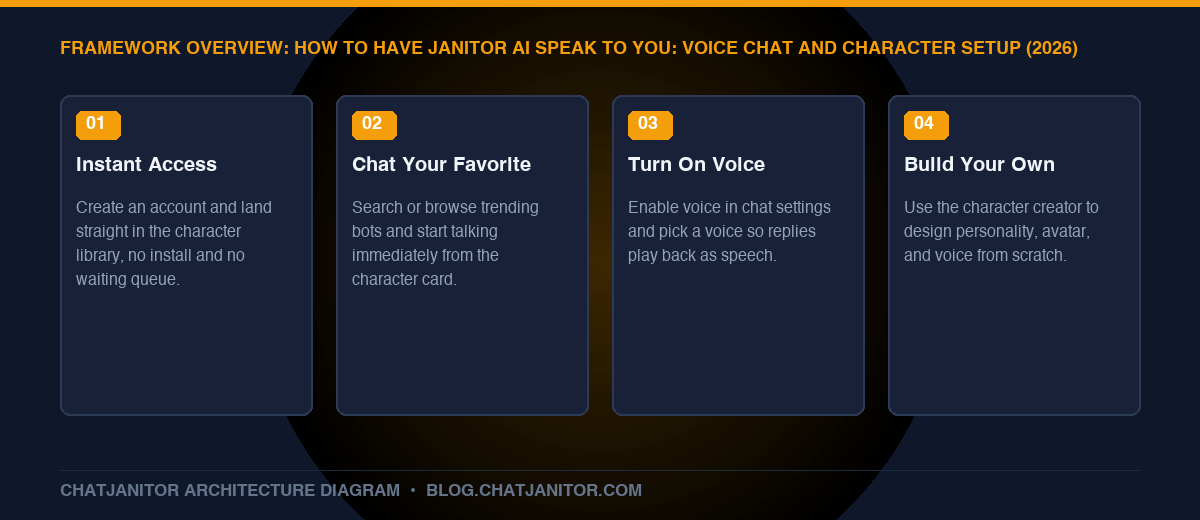
Getting a character to actually speak to you on ChatJanitor takes three steps: pick a character from the library (or build your own in a couple of minutes), open its chat, and turn on voice from the chat settings. No downloads, no complicated setup — just an account and a character you want to talk to.
Key Takeaways
Zero-friction start: Create an account and you’re chatting within seconds — no app install, no waiting list.
Instant access to favorites: Browse the community library and start talking to a character you already love immediately.
Voice makes it feel real: Turning on voice chat gives your favorite characters an actual spoken voice, not just text replies.
Build your own if none quite fit: The character creator lets you design a bot’s look, personality, and voice from scratch in minutes.
Personalize everything: Your own persona, the bot’s voice, and its personality can all be tuned to exactly how you want to experience the chat.
1. Getting Started on ChatJanitor Takes Seconds
There’s no lengthy setup between you and your first conversation:
Create an account with email or Discord — no waiting period, no approval queue.
Set up your persona once (a name and a short description of who you are in the chat) so every character you talk to recognizes you consistently.
Land straight on the character library, already sorted by trending, new, and top-rated bots.
That’s the whole barrier to entry. From here, everything is about choosing who you want to talk to and how you want to hear from them.
2. Chat Instantly With Your Favorite Character
If you already have a character in mind — a personality you’ve seen recommended, a franchise favorite, or a companion type you enjoy — finding and starting that conversation is immediate:
Search by name or tag in the library to jump straight to a specific character.
Browse trending and featured bots if you’re not sure yet and want inspiration.
Tap the character card and start typing — there’s no separate “setup mode” before the conversation begins.
The chat opens with the character’s own greeting message already in character, so the conversation feels alive from your very first message rather than starting from a blank screen.
3. Give Your Bot a Voice
This is what turns a character from “text on a screen” into something that actually feels like it’s speaking to you:
Open the chat settings for the character you’re talking to.
Turn on voice for that conversation.
Choose a voice that fits the character, if more than one option is available for that bot.
Send a message as usual — the reply now plays back as speech in addition to appearing as text.
🔊 Why Voice Changes the Experience
Reading a reply and hearing it are genuinely different experiences — tone, pacing, and personality come through in a way plain text can’t fully capture. Voice is especially popular for companion-style characters and long-running story arcs, where hearing the same “voice” consistently makes the relationship feel continuous across sessions.
4. Build a Character That Truly Feels Like Your Own
If no existing character quite matches what you’re looking for, creating one takes only a few minutes:
Give it an identity — a name, a short one-line premise, and an avatar.
Define the personality — traits, speech style, and background, using our character card templates if you want a proven starting structure.
Write an opening message that sets the tone immediately, so the very first thing your character does is stay in character.
Assign a voice during setup so the character speaks the way you imagined it from the very first conversation, not as an afterthought.
For the full step-by-step creator walkthrough — including sample dialogue and avatar tips — see our complete bot creation guide.
5. Personalize Everything About the Experience
Voice and character choice are just the start. A few more settings make the experience feel tailored specifically to you:
Combining these means two people can talk to the exact same character and have noticeably different experiences — which is the point. The platform is built around making the character feel like yours, not a fixed, one-size-fits-all script.
FAQ
Do I need to set anything up before a character can speak to me?
Just turn on voice in that chat’s settings and pick a voice if more than one is offered — there’s no separate account-level setup required.
Can every character use voice?
Voice availability can depend on the specific character and current platform settings — check the chat settings panel for that character to see what’s offered.
Can I change a character’s voice after I’ve already started chatting with it?
Yes — voice selection lives in the chat settings for that character, so you can switch it at any time without losing your conversation history.
What if I want a completely custom character instead of one from the library?
Use the character creator to build one from scratch — see our step-by-step guide for personality, avatar, and opening message tips.
Conclusion
Getting Janitor AI to speak to you isn’t a technical project — it’s picking a character, flipping on voice, and optionally building your own if nothing in the library feels quite right. Between instant access to favorites, voice chat, and full character customization, the experience is built to feel personal from the very first message.
Janitor AI is a premier open-architecture conversational AI platform tailored for immersive character roleplay, creative writing, and virtual companionship. Offering both the native free JanitorLLM and flexible third-party API proxy integration (OpenRouter, DeepSeek, Claude, OpenAI), Janitor AI provides uncensored creative freedom, sophisticated prompt control, and an active creator ecosystem. In this guide, you will master everything from setup and generation parameters to advanced character persona crafting and troubleshooting common 403 access issues.
Key Takeaways
Architectural Flexibility: Janitor AI separates the conversational front-end from the back-end neural engine, allowing users to switch effortlessly between native JanitorLLM and external LLM APIs.
Uncapped Creative Freedom: Unlike heavily filtered competitors, Janitor AI supports both SFW and mature NSFW roleplay with customizable safety toggles.
Fine-Grained Parameter Tuning: Mastering Temperature (0.7–1.1) and Context Window limits eliminates repetitive looping and maintains long-term character coherence.
Rich Community Ecosystem: Access over 150,000 community-crafted character cards, custom lorebooks, and modular persona templates.
Troubleshooting Readiness: Common roadblocks such as Cloudflare 403 blocks, missing public chats, and proxy token limits can be resolved in minutes with proper network and header configuration.
The Ultimate Guide to Janitor AI and AI Chat Roleplay (2026 Edition) – Key Architectural Framework and Overview
Janitor AI is an advanced conversational platform and community hub dedicated to multi-turn character roleplay, collaborative interactive fiction, and AI personality simulation. Launched as an open alternative to restrictive corporate chat services, it quickly emerged as a community favorite for fiction writers, tabletop RPG enthusiasts, and virtual roleplayers worldwide.
Unlike standard productivity assistants like ChatGPT or Claude, which prioritize factual summarization and task execution, Janitor AI is optimized for narrative depth, emotional resonance, voice fidelity, and dramatic persona persistence.
🎨 Creator Hub & Character Studio
⚡ Inference Engine & Model Routing
Character Cards (v2): Standardized, portable character definitions.
Public & Private Personas: Customizable user identities across all chats.
Lorebooks & World Info: Dynamic keyword-triggered worldbuilding memory.
Community Tags: Rich taxonomy covering Fantasy, Romance, Sci-Fi & RPG.
DeepSeek V3 / R1: High-reasoning, low-cost API integration.
OpenRouter Multi-Provider: Claude 3.5 Sonnet, Llama 3.3 70B & more.
Custom Reverse Proxies: Flexible endpoints for community access.
Whether you want to engage in high-fantasy dungeon crawls, intense sci-fi mysteries, or cozy domestic slice-of-life dialogues, Janitor AI provides the canvas, the formatting syntax, and the model routing necessary to bring complex characters to life.
2. How Janitor AI Works: Architecture and Model Selection
To get the most out of Janitor AI, you must understand its dual-layer architecture: the UI/Character Management Client and the Inference Backend.
🔄 Dual-Layer Inference Architecture
User Input: Sent securely via Janitor AI Web or Mobile PWA.
Frontend Router: Passes prompt context and persona metadata.
Branch A (Native): Routes to JanitorLLM Beta for 100% free cloud inference.
Branch B (External API): Routes through OpenRouter, DeepSeek, or Proxies for expanded context and advanced literary prose.
2.1 Native JanitorLLM (Free Tier)
JanitorLLM is the platform’s proprietary in-house fine-tuned language model. It was trained explicitly on creative roleplay datasets, dialogue scripts, and character instruction vectors.
– Pros: Completely free to use with unlimited messages; natively uncensored; no API keys or credit cards required.
– Cons: Experiencing occasional server queue congestion during peak hours; context memory is generally bounded to 4,096–8,192 tokens.
2.2 Third-Party APIs and Reverse Proxies
For users demanding maximum literary sophistication, Janitor AI features an API connector supporting OpenAI, Claude via OpenRouter, DeepSeek V3/R1, and community reverse proxies. If you need step-by-step instructions on obtaining API credentials, setting up endpoint base URLs, and securely storing bearer tokens, review our full walkthrough on janitor ai api setup.
3. Quick-Start Guide: Setting Up Your First Chat
Embarking on your first roleplay journey on Janitor AI takes less than three minutes:
Account Registration: Navigate to the platform, verify your age (18+ required for mature content access), and set up your public profile handle.
Configure Your User Persona: Before opening a character, click your profile icon and select User Persona. Define your name, appearance, gender identity, and background. This ensures bots automatically address you accurately without needing repetitive explanations.
Select a Bot: Browse the Trending, Popular, or Top Rated tags. Check the bot description, initial greeting message, and user ratings.
Choose Your Backend: Open the chat, click the three horizontal dots (...) in the top navigation bar, select API Settings, and pick between JanitorLLM or your external API key.
Send Your Opening Action: For optimal engagement, respond with a mix of dialogue and narrative action beats rather than a generic “Hello”.
For a detailed visual guide covering interface navigation, mobile shortcuts, and chat management, see our complete tutorial on how to use janitor ai.
4. Mastering Generation Settings: Temperature, Tokens and Context Window
One of the most common pitfalls for new roleplayers is leaving generation parameters at default values, leading to hallucinations, gibberish, or repetitive phrasing.
Parameter
Recommended Value
Impact on Storytelling
Temperature
0.85 (0.70 – 1.10)
Controls creativity. Low values (<0.7) cause dry, repetitive responses; high values (>1.15) cause hallucinations.
Max Response Tokens
450 – 800
Limits the bot’s reply length. Keeps pacing balanced without exhausting API credits.
Context Window
4,096 – 8,192
How many tokens of previous chat history the bot remembers.
Adjusting these settings directly transforms how bot personalities react during tense action or emotional dialogue. To deep-dive into optimal parameter configurations across different model backends, read our analysis on janitor ai settings.
5. Essential Formatting and Chat Commands
Janitor AI processes Markdown and special tag syntax to format dialogue, inner thoughts, and out-of-character instructions.
Standard Markdown Conventions
*Actions, environmental descriptions, and body language*
"Verbal dialogue spoken out loud by the character"
**Emphasis on critical words or intense shouts**
~Playful, flirtatious, or whispered tones~
OOC (Out of Character) Prompts
When a bot breaks character, misinterprets your scenario, or forgets a critical piece of plot information, do not break the fourth wall inside the story. Use standard OOC syntax at the end of your message:
((OOC: Please slow down the pacing. Do not speak on behalf of {{user}}, and describe the surrounding castle environment in more sensory detail.))
Text Streaming vs Batch Generation
Janitor AI allows you to toggle Text Streaming, which renders words one by one as they are synthesized, rather than waiting for the entire paragraph to load. For a full breakdown of syntax shortcuts, formatting variables, and command lists, consult our reference on janitor ai commands list.
6. Character Creation: From Concept to Living Persona
The soul of Janitor AI lies in its creator community. Anyone can create, publish, or privately test custom chatbots. A well-constructed character card prevents the AI from falling out of persona or speaking in bland generic cliches.
Component
Description & Best Practice
Character Identity
Unique name, evocative avatar, and a 1-2 sentence core premise hook.
Psychological Traits
Core personality, moral boundaries, motivations, and secret desires.
Appearance & Attire
Distinctive physical traits, clothing, scents, and signature accessories.
Speech & Dialogue
Speaking cadence, idiosyncratic vocabulary, and <START> dialogue blocks.
First Message (Greeting)
Sensory-driven scene opener establishing POV, pacing, and immediate conflict.
To build characters that captivate thousands of users, learn the full workflow in our dedicated guide on how to make a janitor ai bot. Additionally, save hours of drafting by utilizing battle-tested W++ and JSON format templates from our janitor ai character template library.
7. Advanced Roleplay Techniques: Lorebooks and Memory Retention
As roleplay chats exceed 50 or 100 messages, LLMs naturally begin to forget earlier plot points due to context token limits. Expert creators bypass this constraint through structural techniques:
7.1 Lorebooks and World Info
Lorebooks store encyclopedic entries (characters, factions, locations, magic systems) tied to specific activation Keywords. When a keyword appears in the recent chat history, the associated lore snippet is injected into the bot’s active prompt. Discover how to build and link lorebooks in our guide to ai roleplay memory lorebooks.
7.2 Action Beats and Dialogue Direction
A high-level roleplay response is never just lines of dialogue. It weaves internal monologue, sensory anchors (scents, sounds, weather), and micro-expressions. Master the prose techniques that evoke deep immersion with our tutorial on ai roleplay formatting action beats.
8. Competitive Landscape: Janitor AI vs The Field
How does Janitor AI compare to the broader ecosystem of AI roleplay platforms?
Like any bleeding-edge generative AI service, users may occasionally encounter technical hurdles.
Common Issue
Root Cause
Immediate Fix
403 Access Restricted
Cloudflare WAF IP flag
Disconnect flagged VPN server, clear site cookies, or toggle mobile data.
Public Chats Gone
Platform privacy update
Check the “Community Shares” tab or creator visibility settings.
Repetition Loops
Context token pollution
Edit bot’s past messages, raise Repetition Penalty to 1.12–1.15.
Network / Failed to Fetch
Expired session / Zero API credit
Re-login to refresh auth token or verify prepaid API balance on OpenRouter.
Cloudflare 403 Access Restricted: Often caused by flagged VPN exit nodes, stale browser cookies, or adblocker script interference.
Public Chats Gone: Following privacy compliance updates, public chat logs were moved into dedicated community sharing tabs or toggled private by bot creators.
Repetitive Dialogue Loops: When an AI gets stuck repeating phrases like “a predatory smirk” or “can I ask you a question?”, tweak your parameters or follow our step-by-step fix in fix ai roleplay repetitive loops.
For detailed recovery steps on all error codes, refer to our troubleshooting manual on janitor ai not working.
10. Roleplay Prompts, Safety and Jailbreaks
Whether you want to explore thrilling adventures, slow-burn romantic storylines, or intense psychological drama, having the right prompt foundation is essential.
System Prompts & Scenario Library: Discover over 100 battle-tested roleplay prompts in our ai chat roleplay prompts compendium.
Content Filtering & Safety Rules: Understand terms of service, acceptable use, and jailbreak mechanics responsibly via our janitor ai jailbreak guide.
Creative Inspiration: Never run out of scenario ideas with our curated list of roleplay fantasy ideas.
11. Frequently Asked Questions (FAQ)
Is Janitor AI free to use?
Yes. Janitor AI offers its native JanitorLLM beta model completely free with no subscription required. If you choose to connect third-party APIs (such as OpenRouter, OpenAI, or DeepSeek), you only pay those respective API providers for the tokens you consume.
Is Janitor AI safe and private?
Private chats with characters on Janitor AI are confidential and not visible to other users. However, always exercise standard internet caution: do not share sensitive personal information, passwords, or financial data in chat sessions.
Can Janitor AI be used on mobile devices?
Yes. While there is no standalone app in the official app stores due to mature content guidelines, Janitor AI is fully responsive on mobile web browsers and can be saved to your home screen as a Progressive Web App (PWA).
What should I do if the bot starts speaking for me?
Include a system prompt or OOC note: ((OOC: Strictly roleplay as {{char}}. Never dictate the actions, dialogue, or inner thoughts of {{user}}.)) This instructs the attention mechanism to confine output strictly to the bot persona.
Conclusion and Next Steps
Janitor AI represents the future of interactive storytelling—a versatile, community-driven platform where human creativity collaborates seamlessly with advanced artificial intelligence. By understanding the core mechanics of model selection, mastering generation parameters, and utilizing proper character card design, you unlock limitless narrative possibilities.
To create a Janitor AI bot, navigate to the Create Character portal, define your character’s name and avatar, write a structured Personality & Description definition using pseudo-code or Markdown, specify Example Dialogue (<START> blocks), and draft an engaging First Message that sets an immediate narrative scene. Reference our overarching janitor ai guide for platform mechanics.
Key Takeaways
The Power of the First Message: The opening greeting dictates 80% of the bot’s writing style, tone, and response length. Make it vivid and sensory.
Token Efficiency: A lean, structured character definition (800–1,200 tokens) leaves ample room in the context window for actual conversation history.
Example Dialogues Anchor Voice: Incorporating <START> example dialogue prevents the character from devolving into generic assistant-speak.
Visibility Settings: Test your character privately before publishing it to the public community explore feed.
How to Create a Janitor AI Bot: Step-by-Step Character Creator Guide (2026) – Key Architectural Framework and Overview
1. Introduction: Becoming a Bot Creator
Creating characters on Janitor AI is equal parts creative writing and prompt engineering. Anyone can throw together a three-sentence prompt, but building a bot that stays in character for hundreds of messages requires deliberate architectural structure.
🏗️ 4-Phase Character Creator Pipeline
Concept & Avatar: Define a distinct archetype, personality hook, and upload a high-contrast 1:1 square avatar.
Structured Definition: Write personality traits, motivations, and speech quirks using W++ format.
Example Dialogue: Provide 2-3 sample exchanges wrapped in <START> tags to anchor voice cadence.
First Message Hook: Craft a sensory, action-oriented scene opener that establishes narrative stakes immediately.
This guide walks you through every field in the Janitor AI Character Creator to ensure your bots are captivating, resilient against hallucinations, and beloved by the community.
2. Step-by-Step Creation Walkthrough
Step 1: Open the Character Studio
From the Janitor AI homepage, click Create in the navigation bar and select Character.
Step 2: Basic Identity Information
Character Name: Use the character’s recognizable name.
Avatar: Upload a high-resolution, thematic 1:1 image. The avatar is what catches users’ eyes in the trending feed.
Short Tagline / Description: A 1-2 sentence hook summarizing who the character is and the core roleplay premise.
Step 3: Character Definition (Personality and Persona)
This is the heart of your bot. Avoid rambling prose essays. Instead, use categorized formatting:
[Character("Eldrin")]
[Gender("Male")]
[Age("28")]
[Appearance("Silver hair, athletic build, piercing blue eyes, wears weathered leather armor")]
[Personality("Pragmatic, dry wit, fiercely loyal, distrustful of strangers, secretly compassionate")]
[Backstory("Former royal knight exiled after uncovering corruption in the high council. Now works as a wandering monster hunter.")]
[Habits("Fiddles with a worn silver coin when stressed; speaks in calm, measured tones.")]
Step 4: The First Message (The Greeting)
The first message is the single most influential prompt in your entire character card. The AI will mimic the greeting’s sentence structure, length, formatting style, and narrative POV.
*Rain drums rhythmically against the tavern window panes. Eldrin sits with his back to the wall, methodically sharpening the edge of his steel dagger. When the bell above the door chimes and you step inside, his gaze shifts upward, narrowing slightly as he assesses your presence.*

"You're late," *he mutters, sheathing the blade with a crisp metallic click.* "Sit down before you draw more attention."
Step 5: Example Dialogues
Include 2–3 brief dialogue exchanges enclosed in <START> tags to teach the model speech cadence and idiosyncratic vocabulary:
<START>
{{user}}: "Are you sure we can trust this path?"
{{char}}: *Eldrin pauses, examining the fresh footprints in the mud before glancing back over his shoulder.* "Trust has nothing to do with it. It's the only path that won't leave us boxed in by imperial scouts."
3. Best Practices for High-Performing Bots
Element
Do This
Avoid This
Tone
Specific personality quirks & speech habits
Generic adjectives like “smart and nice”
Token Size
700 – 1,200 tokens
2,500+ tokens (causes context amnesia)
Perspective
Third-person past tense (*he walked*)
Second-person (*you walk*) which causes bot confusion
Agency
Prompt: {{char}} will only speak for himself
Leaving bot free to write user responses
For pre-built prompt building blocks and jailbreak prevention, browse our compendium of ai chat roleplay prompts.
Conclusion
Building memorable AI characters is an immensely rewarding craft. By pairing a concise structured definition with an evocative opening greeting, your bots will stand out in the Janitor AI catalog.